 Ptah
Watch a Schema Change in Ptah's Drift View
Schema drift means the live database no longer matches the schema file in Git. Add a column by hand, see the read-only viewer report it, then decide what to do.

Ptah helps you plan, review, and apply database migrations. Try in your browser
Your schema file in Git says the orders table has three columns. The
production database has four, because someone added one during an incident
and never wrote it down. Nothing is broken today. The next migration that
touches orders runs against a table nobody reviewed.
That gap is schema drift: the live database no longer matches the schema
you declared. This article creates drift on purpose in a disposable SQLite
database and shows how ptah schema serve reports it.
What schema drift is and how it happens
Section titled “What schema drift is and how it happens”Ptah projects keep the desired schema in a SQL file, schema.sql, tracked in
Git like any other source. Changes reach the database through reviewed
migrations. The database is supposed to follow the file.
It does not always follow. Drift starts when someone changes the database without changing the file:
- an engineer runs
ALTER TABLEin a SQL client to debug something - an emergency fix goes straight to production and the follow-up never happens
- a script, a tool, or another team changes the catalog outside the migration workflow
- one environment receives a change that the others do not
Each case leaves the database and schema.sql disagreeing, and nobody is told.
Why drift becomes a problem
Section titled “Why drift becomes a problem”A migration written against the declared schema may fail on a table that has
an unexpected column, or succeed and keep the surprise. A deployment can
depend on an object that exists in staging only. A new environment built from
schema.sql will lack whatever the old one gained by hand, so two
environments behave differently for reasons that are not in the repository.
The longer drift goes unnoticed, the harder it is to tell whether the change was intended.
Inspect the schema with ptah schema serve
Section titled “Inspect the schema with ptah schema serve”ptah schema serve starts a local web page that shows the declared schema
and compares it with a live database. It reports each difference as a
category with a count and a severity.
The viewer is read-only. It detects and reports. It does not change the database or the schema file, and it does not apply anything on its own.
Start with the deployed shop from
the first-project example. Keep its
reviewed schema.sql alongside the database:
ptah schema serve --db-url sqlite://shop.db --schema-file schema.sql --addr 127.0.0.1:57061 --refresh 0Open http://127.0.0.1:57061/ in a browser. This run disables timed refresh
and uses explicit reloads, so each screenshot corresponds to a known state.
The viewer documentation explains
the refresh setting and the read-only interface. The examples use
Ptah 0.13.0 and the synthetic SQLite order service.
This closes the visual series that began with a generated entity diagram and a portable HTML reference.
State 1: the database matches the file
Section titled “State 1: the database matches the file”Before any change, the viewer reports no differences:
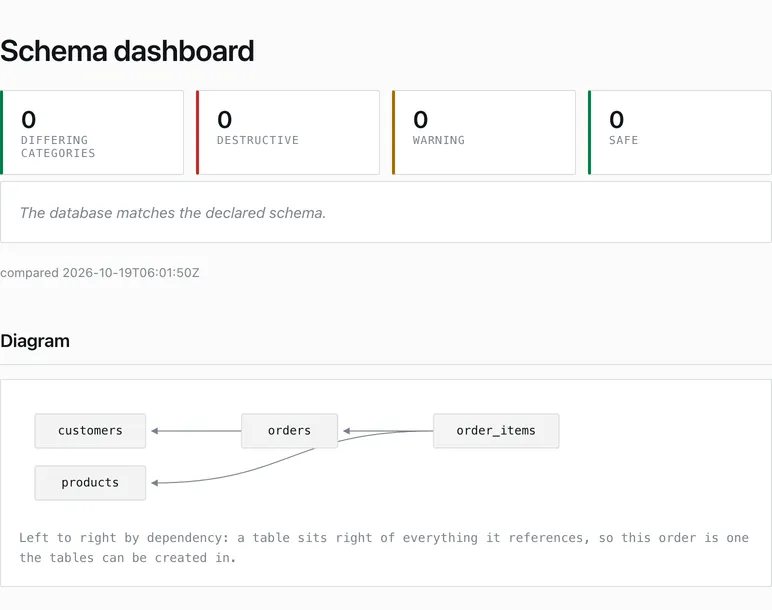
Open this state as a live page, saved as the viewer served it. No Ptah process is needed.
The table sections describe the declared schema. The comparison tells us whether the live database differs from it. They are related views, but the field list is not an editor for the live catalog.
State 2: add a column by hand
Section titled “State 2: add a column by hand”In a separate SQLite client, we executed:
ALTER TABLE orders ADD COLUMN support_note TEXT;We did not add this column to schema.sql. This is the emergency fix from the
opening, in miniature. On browser reload, the viewer reported one differing
category, columns_removed, with destructive severity:
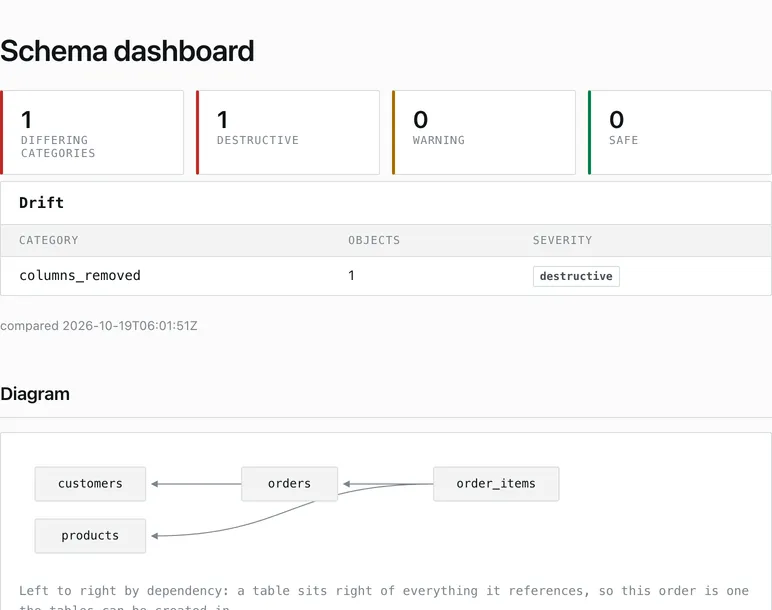
Open this state as a live page.
Why an added column is called columns_removed
Section titled “Why an added column is called columns_removed”The label looks backwards. We added a column, and the category says removed.
The category describes the change needed to reconcile the live database
with the declared schema, not the operation that caused the drift. The
file says orders has no support_note. To make the database match the
file, Ptah would have to remove that column. So the reconciliation is a
column removal, and the viewer names it that way. It does not mean a column
was removed, and the viewer removed nothing.
destructive is the severity of that reconciliation. Dropping a column
discards whatever it holds, so applying the change could lose data. Here the
column was empty and disposable. In a real database it might hold values an
operator wrote by hand.
Detection is not an instruction. A destructive entry means “look at this before you do anything”, not “apply this”.
Find which column the viewer is talking about
Section titled “Find which column the viewer is talking about”The viewer reports a category and a count. It does not name the table or the
column, so support_note appears nowhere on the page. Two CLI commands run the
same comparison and answer different questions. With the extra column still in
place, ptah schema compare shows what differs and how to reconcile it:
ptah schema compare --db-url sqlite://shop.db --schema-file schema.sqlComparing schema from schema.sql with database sqlite://shop.db=== SCHEMA COMPARISON ===
Differences detected (1 category): tables_modified (1): orders
Reconciling SQL:-- Disable foreign-key enforcement for the table rebuild belowPRAGMA foreign_keys = off;-- SQLite table rebuild for changes ALTER TABLE cannot express on ordersCREATE TABLE "__ptah_rebuild_orders" ( "id" integer PRIMARY KEY, "customer_id" integer NOT NULL CONSTRAINT "fk_orders_customer_id" REFERENCES "customers" ("id"), "status" TEXT NOT NULL DEFAULT 'queued');INSERT INTO "__ptah_rebuild_orders" ("id", "customer_id", "status") SELECT "id", "customer_id", IFNULL("status", 'queued') AS "status" FROM "orders";DROP TABLE "orders";ALTER TABLE "__ptah_rebuild_orders" RENAME TO "orders";-- Restore foreign-key enforcement after the table rebuildPRAGMA foreign_keys = on;It names the table, orders. The column is visible only by absence: the
rebuilt table has no support_note, and the INSERT copies the other three
columns. That is the destructive part in concrete form, because applying this
SQL would drop the column and its values. SQLite cannot drop a column in
every case, so the plan rebuilds the table. The command prints the plan and
changes nothing. By default it exits 0 even when it finds differences.
ptah schema drift runs the same comparison to give a verdict:
ptah schema drift --db-url sqlite://shop.db --schema-file schema.sqlSchema drift detected (highest severity: destructive).Failure threshold: all. Failing: true.Database: sqlite://shop.db
Findings:- columns_removed: 1 (destructive)This is the same category and severity the viewer shows, with no reconciling
SQL. The command exits 1 when drift exceeds the threshold, and 2 when the
check itself fails, so a pipeline can tell “drift found” from “could not
check”. Two options shape the verdict. --severity destructive fails only on
destructive findings and lets safe ones pass. --ignore tables=audit_log
leaves out objects that are expected to differ. With the threshold set to
destructive, this finding still fails the check:
Schema drift detected (highest severity: destructive).Failure threshold: destructive. Failing: true.Database: sqlite://shop.db
Findings:- columns_removed: 1 (destructive)
Use compare to understand a difference and drift to decide whether a
build may continue.
State 3: remove the column and reload
Section titled “State 3: remove the column and reload”For this controlled demonstration, the added column was empty and disposable. We removed it with a separate client command:
ALTER TABLE orders DROP COLUMN support_note;The next reload returned to zero differences:
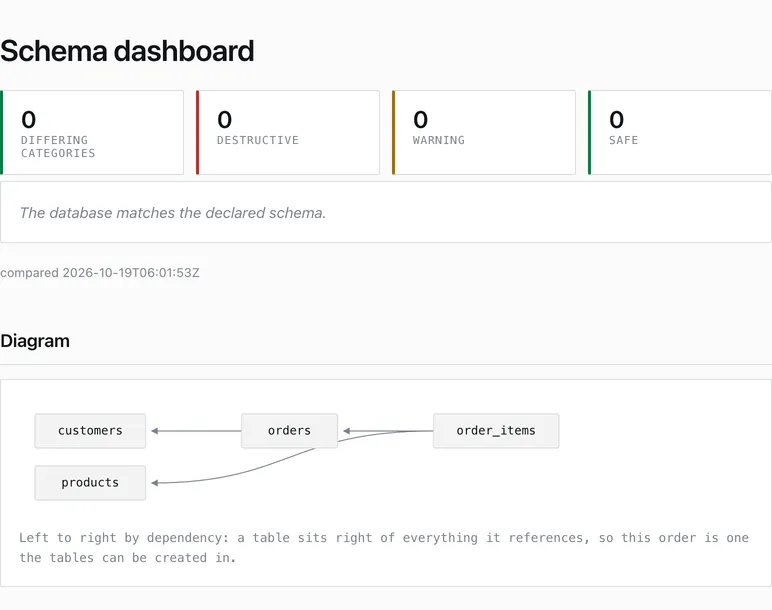
Open this state as a live page.
The linked pages are the viewer’s responses, saved unchanged. Each is a single
file with inline styles and no scripts, and keeps the comparison time of its
capture. The changed text and
restored text hold the same content as
plain text.
We also sent POST / to the viewer and received 405, consistent with its
read-only interface. The checked pages made no external requests.
After the restore, ptah schema drift agrees with the viewer:
No schema drift detected.It exits 0.
What to do after you find drift
Section titled “What to do after you find drift”The viewer shows that a difference exists and which way reconciliation would go. It cannot know why the difference exists. Start there, then pick one of three paths:
- Investigate. If nobody can explain the change, find out who made it and why before touching anything. Check the column’s contents first, because the destructive direction is the one that loses data.
- Accept the change. If the change was intended, such as the emergency
fix that turned out to be right, add it to
schema.sqland write a reviewed migration so every environment gets it. The file and the database agree again, and the history says why. - Revert the change. If the change was a mistake, undo it in the
database, as we did with
restore.sql. Do this only when the data it holds is disposable or has been preserved elsewhere.
The viewer helps with the first step. It is a local way for a person to look at a mismatch with the expected tables and relationships beside it.
Local view and CI checks
Section titled “Local view and CI checks”The browser view is for investigation. It does not stop a bad release. For a
release gate, run ptah schema drift as shown above, so a pipeline fails on a
mismatch without anyone looking at a page. For example, our
PostgreSQL project compares the deployed
schema after running the application.
The example used a loopback listener and a synthetic local database. It does not demonstrate a public dashboard, an authentication proxy, or production monitoring. The troubleshooting guide covers the CLI checks to use when a mismatch needs further investigation.
Put Ptah to work
Example files
- build-provenance.json
- change.sql
- images/changed@2x.png
- images/clean@2x.png
- images/restored@2x.png
- measured/browser-checks.txt
- measured/commands.json
- measured/compare-changed.txt
- measured/drift-changed.txt
- measured/drift-destructive.txt
- measured/drift-restored.txt
- measured/post-status.txt
- measured/version.txt
- measured/viewer-changed.html
- measured/viewer-changed.txt
- measured/viewer-clean.html
- measured/viewer-clean.txt
- measured/viewer-restored.html
- measured/viewer-restored.txt
- migrations/1790430911_shop.down.sql
- migrations/1790430911_shop.up.sql
- migrations/ptah.sum
- README.md
- restore.sql
- schema.sql
- verified.json


