 Ptah
Give Your Team a Database Reference They Can Open
Export a self-contained Ptah HTML reference with tables, relationships, navigation, and light and dark themes, then inspect the actual result.

Ptah helps you plan, review, and apply database migrations. Try in your browser
A schema reference should let a teammate find the order table, follow its customer reference, and read the fields without installing your database client. Ptah can export that page as a single HTML file.
This is the actual output from Ptah 0.13.0 for our four-table order service:
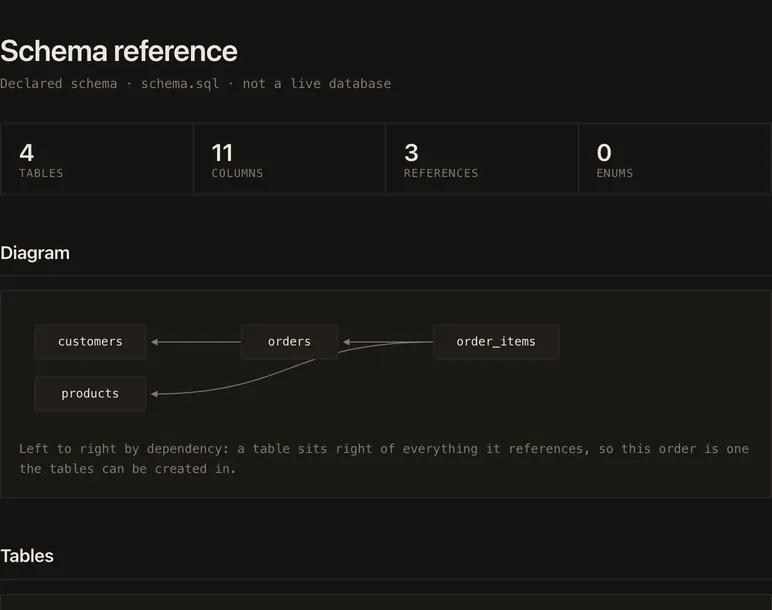
Open the generated reference. The page in that link is the export itself, rather than a screenshot or a hosted database console. This is part two of the visual series, following the catalog diagram.
Export the declared schema
Section titled “Export the declared schema”We use the same schema.sql as the
first-project example: customers,
products, orders, and order items.
ptah schema export --to html --schema-file schema.sql --out shop.htmlExported schema documentation to /work/shop.htmlFound 4 table(s), 11 field(s), 0 enum(s)The command reads a local schema file and writes shop.html. This reference
therefore describes the declared schema. It does not establish what is
currently deployed or query application rows. For a catalog snapshot, retain
an inspected SQL file as in the first visual article and make its origin
clear to the reader.
The documentation export guide explains the command’s input and output options. Our example directory keeps the exact schema and HTML used for these pictures.
Follow an order to its customer
Section titled “Follow an order to its customer”The sidebar lists all four tables. Clicking orders moves to the table’s
section. The field table shows its primary ID, customer reference, and
queued default:
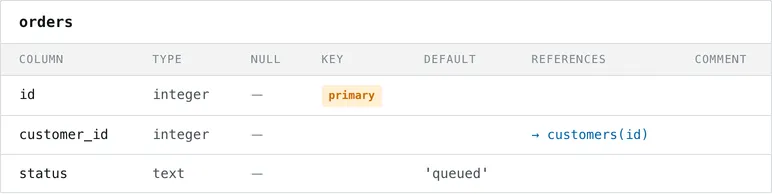
We exercised that navigation in a browser and checked the #orders anchor.
The inline relationship diagram also gives the dependency path without
requiring the reader to reconstruct it from several CREATE statements.
The reference marks id as a primary key and shows the customer foreign
key as a link. It also marks both fields of the item table’s composite
primary key. The quantity and price CHECK expressions remain in the
source schema; use that file and the database tests
when a review depends on their exact conditions.
Carry the reference without a service
Section titled “Carry the reference without a service”The exported file includes its styles and diagram. We opened it in both light and dark browser themes, followed its table navigation, and observed zero external requests during those checks. A teammate does not need a running Ptah process or access to the database to read this artifact.
That makes the file useful beside a reviewed release or in an internal
project workspace. It also means it remains a snapshot: changing schema.sql
does not silently update an HTML file already sent to a teammate. Regenerate
it with the reviewed schema and retain the version association.
The reference contains schema names and relationships. It should receive the same access controls as the schema source. Our public example uses only synthetic shop objects. Keeping the export in your own artifact storage lets you decide its audience without adding a third-party documentation service to the workflow.
Add a live comparison when the question changes
Section titled “Add a live comparison when the question changes”This export answers “what does this schema file describe?” To ask whether a running database still matches that file, continue with Watch a Schema Change in Ptah’s Drift View. The next article shows the real interface before a manual column addition, after the change, and after restoring the example database.
Put Ptah to work
Example files
- build-provenance.json
- images/orders-dark@2x.png
- images/orders-light@2x.png
- images/shop-dark@2x.png
- images/shop-light@2x.png
- measured/browser-checks.txt
- measured/commands.json
- measured/html.txt
- measured/shop-dark-page.txt
- measured/shop-light-page.txt
- measured/version.txt
- migrations/1790430911_shop.down.sql
- migrations/1790430911_shop.up.sql
- migrations/ptah.sum
- README.md
- schema.sql
- shop.html
- verified.json


