 Ptah
Draw the Database You Actually Have
Turn a live SQLite catalog into a Ptah entity diagram, trace the order relationships, and retain both the inspected SQL and the generated image.

Ptah helps you plan, review, and apply database migrations. Try in your browser
The order service has four tables and three foreign keys. A diagram makes the path from an order item to its customer visible before anyone reads the migration history.
This image comes from Ptah 0.13.0, using a schema inspected from the working SQLite database in the first-project example. It is the product’s generated diagram, rendered in a browser:
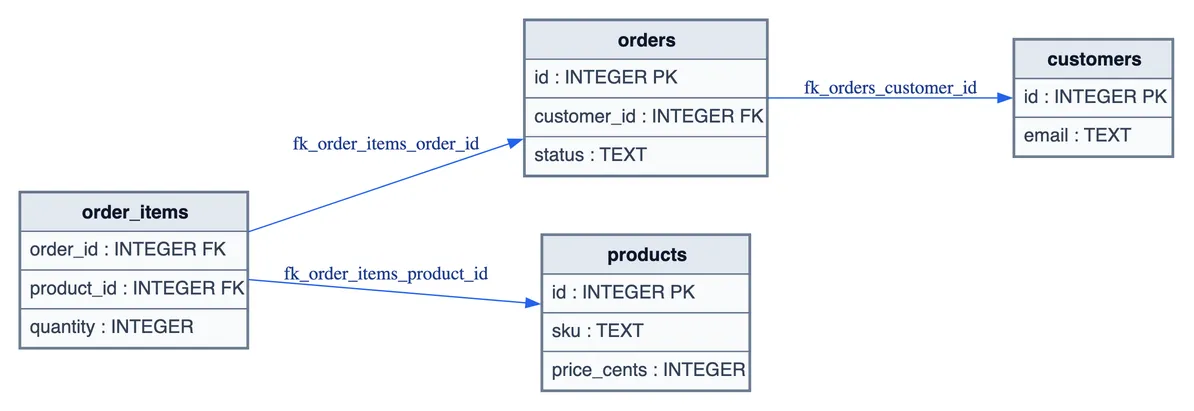
Open the vector image to zoom into the fields.

Begin with the catalog
Section titled “Begin with the catalog”A diagram drawn from a desired schema describes your intended design. For this picture, we first inspected the database that had already accepted an application order:
ptah schema inspect --db-url sqlite://shop.db --format sql > inspected.sqlThe inspected SQL is retained beside the image. It contains the table definitions and constraints Ptah read through its SQLite driver. It contains no customer rows or order contents.
That distinction helps a reviewer understand the image’s origin. It is a snapshot of this inspected catalog, taken on October 14, 2026; it will not update when the database changes. Inspect the catalog and regenerate the diagram after a change.
Produce a diagram you can inspect as text
Section titled “Produce a diagram you can inspect as text”ptah viz --schema-file inspected.sql --dialect sqlite --include-columns --format mermaid > live-shop.mmdPtah returned:
erDiagram customers { INTEGER id PK TEXT email } orders { INTEGER id PK INTEGER customer_id FK TEXT status } products { INTEGER id PK TEXT sku INTEGER price_cents } order_items { INTEGER order_id FK INTEGER product_id FK INTEGER quantity } orders ||--o{ order_items : "fk_order_items_order_id" products ||--o{ order_items : "fk_order_items_product_id" customers ||--o{ orders : "fk_orders_customer_id"The text output makes the relationships reviewable in a diff. order_items
references both orders and products. orders references customers.
That gives a new developer a concrete path through the model when looking
for the owner or price of an order item.
The diagram’s field list is a summary, not a complete rendering of every constraint. For example, this output marks the item references as foreign keys but does not label their composite primary key. The inspected SQL retains that definition. Keep the SQL and constraint tests available when the review depends on uniqueness, nullability, or checks.
Render the same input as SVG
Section titled “Render the same input as SVG”ptah viz --schema-file inspected.sql --dialect sqlite --include-columns --format svg > live-shop.svgThis path used Graphviz 14.1.5 to lay out the SVG. The visualization documentation lists the rendering formats and prerequisites. We opened the resulting file in a browser and captured the image above; no model or external diagram service participated in the render.
Use the SVG for zooming or a design review, and keep the Mermaid text when
you want a readable source diff. Both files in this example came from the
same retained inspected.sql. The example files include
the input and both outputs.
Put the picture beside the change
Section titled “Put the picture beside the change”A useful review packet can contain the migration, the inspected starting schema, the diagram, and the test result. The diagram answers where the relations lead. The SQL answers what the constraints actually say. The test answers whether the chosen operation still behaves as required.
The rendered file has no live database connection. Sharing it still shares your table and field names, so choose its audience as you would for schema SQL. This example uses synthetic names and data throughout.
Put Ptah to work
Example files
- application.py
- build-provenance.json
- images/diagram@2x.png
- inspected.sql
- live-shop.mmd
- live-shop.svg
- measured/application.stderr.txt
- measured/application.txt
- measured/browser-checks.txt
- measured/catalog-audit.json
- measured/commands.json
- measured/graphviz-version.stderr.txt
- measured/graphviz-version.txt
- measured/inspect.stderr.txt
- measured/inspect.txt
- measured/mermaid.stderr.txt
- measured/mermaid.txt
- measured/migrate.stderr.txt
- measured/migrate.txt
- measured/svg.stderr.txt
- measured/svg.txt
- measured/version.stderr.txt
- measured/version.txt
- migrations/1790430911_shop.down.sql
- migrations/1790430911_shop.up.sql
- migrations/ptah.sum
- README.md
- schema.sql
- verified.json

