 Ptah
The Ptah Playground Now Runs PostgreSQL
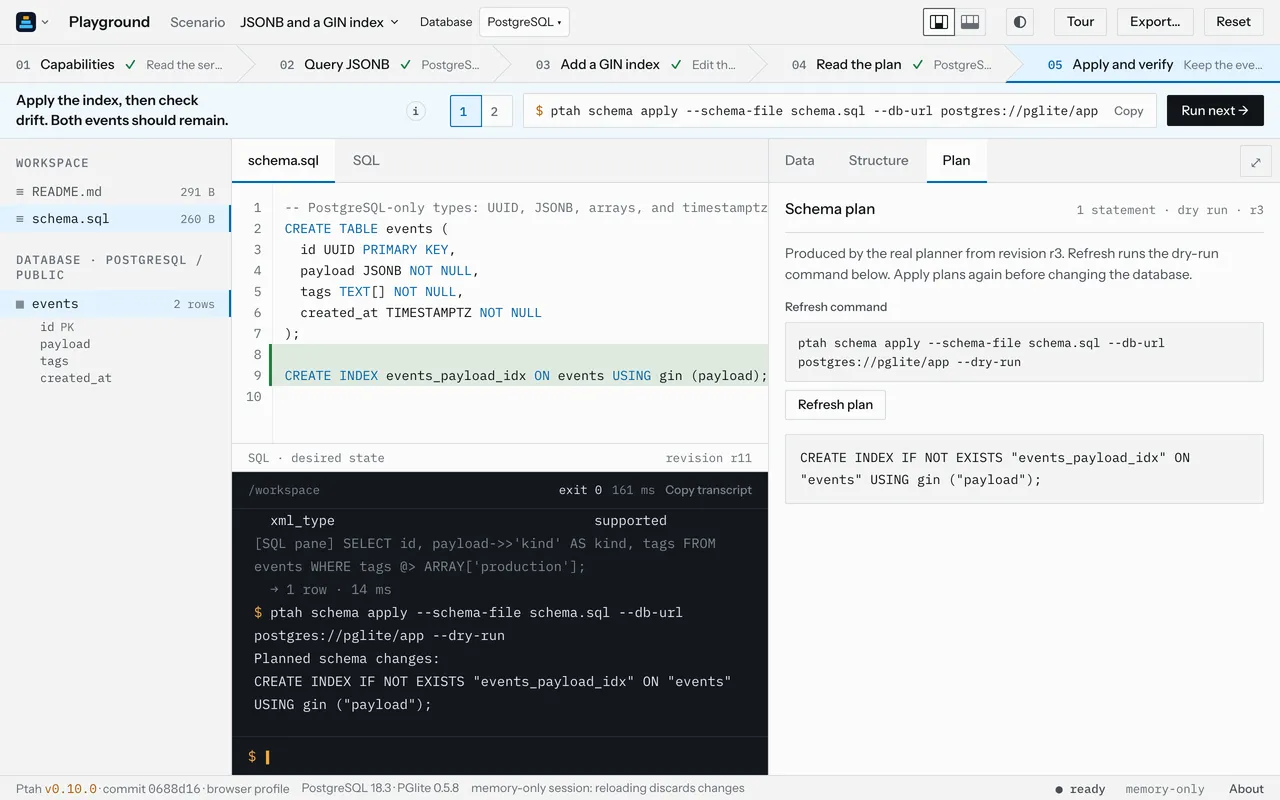
play.ptah.run now runs PostgreSQL 18.3 in your browser tab through PGlite. A new scenario queries JSONB, then plans and applies a GIN index with Ptah.

Ptah helps you plan, review, and apply database migrations. Try in your browser
Until today the playground ran Ptah against SQLite only. That was fine for adding a column, but most people who try Ptah deploy to PostgreSQL, and a lot of what they care about has no SQLite equivalent: JSONB, arrays, UUIDs, GIN indexes.
play.ptah.run now runs PostgreSQL 18.3 as well, through PGlite 0.5.8, in the same browser tab. Ptah is the same real CLI as before, now at v0.10.0, compiled to WebAssembly. Nothing is installed, and the database lives in memory.
Pick a database first
Section titled “Pick a database first”On your first visit the playground asks which database you want:
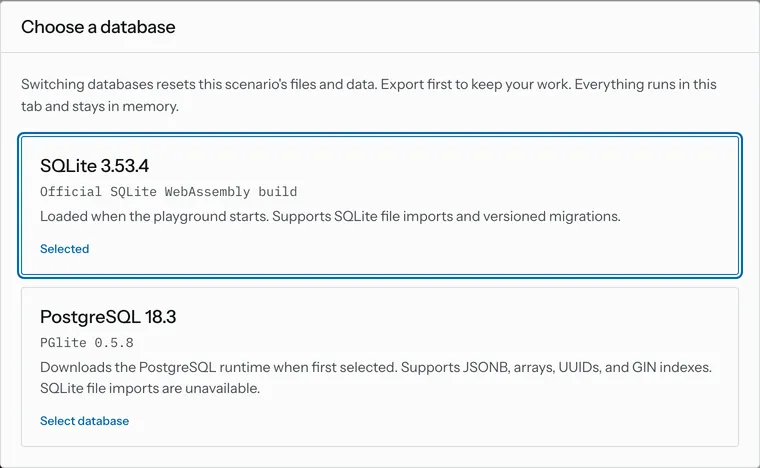
SQLite is there as soon as the page loads. PostgreSQL downloads the first time
you pick it; on our connection it was ready about two and a half seconds after
the click. The playground remembers your choice. A link can also pick one for you:
?engine=postgres opens the playground on PostgreSQL.
Switching databases resets the current scenario, and the dialog says so before you switch.
Which scenarios run where
Section titled “Which scenarios run where”Each scenario now says which databases it supports:
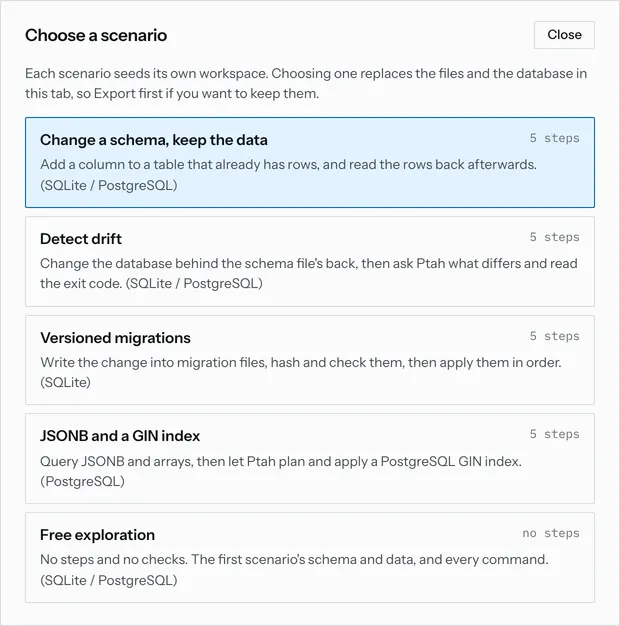
Versioned migrations stay SQLite-only for a concrete reason. Ptah’s migration runner on PostgreSQL uses one database session to hold its lock and another to run the migrations, and PGlite provides a single session. The other scenarios don’t need two sessions, so they run on either database.
A walk through JSONB and a GIN index
Section titled “A walk through JSONB and a GIN index”This scenario starts with one table and two rows:
CREATE TABLE events ( id UUID PRIMARY KEY, payload JSONB NOT NULL, tags TEXT[] NOT NULL, created_at TIMESTAMPTZ NOT NULL);The first step asks Ptah what it is talking to:
$ ptah db capabilities --db-url postgres://pglite/appDialect: postgresServer version: 18.3Server product: postgresBanner: PostgreSQL 18.3 (PGlite 0.5.8) on wasm32-unknown-emscripten, compiled by emcc (Emscripten gcc/clang-like replacement + linker emulating GNU ld) 3.1.74 (1092ec30a3fb1d46b1782ff1b4db5094d3d06ae5), 32-bitCapability preset: Postgres18 (postgres)Preset source: version-ladderSupport level: certifiedRelease line: 18Ptah reads the version from the server, as it would against any PostgreSQL, and picks its PostgreSQL 18 profile. The full output goes on to list every capability it will rely on when it plans.
The second step runs a query from the SQL pane, using a JSONB operator and an array operator:
SELECT id, payload->>'kind' AS kind, tags FROM events WHERE tags @> ARRAY['production'];It returns the deploy event. Clicking a row in the Data pane opens the whole record, which helps with values too long for a table cell:
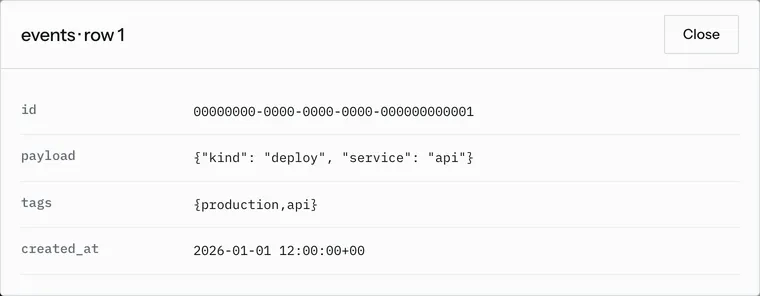
Now the schema change. The third step adds a GIN index to schema.sql, the
file that describes the schema you want:
CREATE INDEX events_payload_idx ON events USING gin (payload);Nothing in the database has changed yet. The fourth step asks Ptah for the plan without applying it:
$ ptah schema apply --schema-file schema.sql --db-url postgres://pglite/app --dry-runPlanned schema changes:CREATE INDEX IF NOT EXISTS "events_payload_idx" ON "events" USING gin ("payload");This is the same planner Ptah runs against a PostgreSQL server. We gave the
same schema.sql and the same two rows to the native Ptah v0.10.0 binary and a
PostgreSQL 18.6 server, and it printed the same plan, byte for byte.
The last step applies the change. Ptah prints the plan again and asks you to
type YES, then the step checks for drift:
$ ptah schema drift --schema-file schema.sql --db-url postgres://pglite/appNo schema drift detected.Both rows are still in the table, and the index shows up in the database list on the left.
A plan that knows it is out of date
Section titled “A plan that knows it is out of date”After the apply, the Plan pane still shows the index statement, but it no longer describes the database. The pane says so:
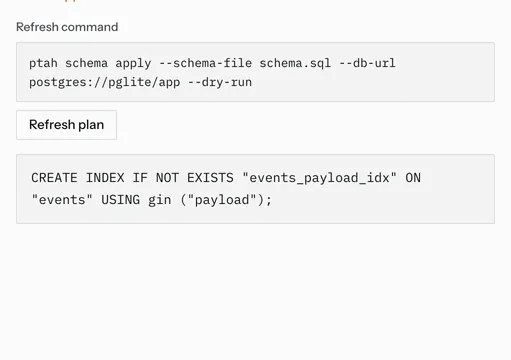
Refresh plan runs the dry-run command shown above it, through the same terminal. With the index in place, there is nothing left to do:
$ ptah schema apply --schema-file schema.sql --db-url postgres://pglite/app --dry-runSchema is synced, no changes to be made.It is also the quickest way to get a new plan after you edit schema.sql
yourself.
Limits
Section titled “Limits”- The PostgreSQL database lives in memory, in this tab. Reloading the page discards it.
- PGlite gives the playground one SQL session, so the versioned migrations scenario runs on SQLite only.
- SQLite file import is not available while PostgreSQL is selected.
The earlier post on the playground update covers the guided steps, the editor marks and the phone layout, which work the same way on both databases. To try the new scenario, open play.ptah.run with PostgreSQL and pick JSONB and a GIN index.
Put Ptah to work
Example files
- expected/capabilities.txt
- expected/events-table.sql
- expected/gin-index.sql
- expected/query.sql
- measured/0-record-dialog.txt
- measured/1-capabilities.txt
- measured/2-query-result-pane.txt
- measured/3-schema.sql
- measured/4-dry-run.txt
- measured/4-plan-pane.txt
- measured/5-apply.txt
- measured/5-drift.txt
- measured/6-plan-pane.txt
- measured/6-refresh-plan.txt
- measured/about.txt
- measured/browser.txt
- measured/engine-link.txt
- measured/native-dry-run.txt
- measured/rail.txt
- README.md
- seed.sql