 Ptah
Ptah Operator vs SchemaHero: Kubernetes Schema Operators Compared
We ran Ptah Operator and SchemaHero on one cluster: stale plans, destructive changes, drift, failed statements, approvals, and PostgreSQL coverage.

Ptah helps you plan, review, and apply database migrations. Try in your browser
Ptah Operator and SchemaHero both let a team declare a database schema as Kubernetes resources and have a controller change the database. The important difference is what happens between a reviewed plan and the statement that runs. A database does not wait for a reviewer: a hotfix lands, the spec is edited again, a statement starts to fail.
Ptah Operator binds an approval to the state of the database and refuses to run when that state has moved. SchemaHero 0.26.2 binds an approval to the text of the SQL and runs that text. Most of the results below follow from that.
The second difference is where the SQL lives. SchemaHero keeps it in the cluster. With PtahMigration, it lives in your repository, and the database keeps its own record of what ran. We deleted the cluster to see what that means.
We build Ptah, so weigh our conclusions accordingly. We ran the released versions of both products on one Kubernetes 1.37 cluster, with each scenario in its own namespace and its own PostgreSQL 17.11. Both operators connected as the same ordinary login, which holds what Ptah Operator’s documentation asks for and owns what it creates. Hand edits ran as a separate superuser. The manifests, commands and recorded output for both sides are beside this post.
| What we tested | SchemaHero 0.26.2 | Ptah Operator 0.2.10 |
|---|---|---|
| Where the reviewed SQL lives | In a Migration object in the cluster |
In your repository, with PtahMigration |
| The cluster is lost | No SQL and no record of what ran | Files in the repository, history in the database, and the next plan starts from version 3 |
| Renaming a column with data | Lost the data and stopped halfway | A reviewed RENAME COLUMN kept every row |
| The database changed after review | Ran the old SQL, failed 32 times in three minutes, then applied it unattended once it could | Refused before any statement ran and planned again |
| The spec changed again before approval | Ran the replaced plan, so the database no longer matched the spec | Refused the old fingerprint |
| Unattended removal of a column with data | Dropped the column and its data | Blocked the plan and kept the data |
| A hand edit to the database | No migration and no log line in five minutes | Reported in 76 seconds, by category |
| A statement that fails | Retried 30 times in two minutes, then ran unattended once it could | Warned in the plan, did not retry, and required a new approval |
| Who approved | Recorded any name passed to --actor |
Recorded the Kubernetes identity, for PtahMigration also in the database’s log, and can refuse the author |
| PostgreSQL objects in one desired schema | No fields for most of them, and type: gin built a B-tree |
13 of 13 created and converged |
| Adding a column beside a composite foreign key | Also dropped and recreated the key | One ADD COLUMN |
| Web console | None | Ptah Console |
Where the SQL lives
Section titled “Where the SQL lives”SchemaHero has no migration files. You keep Table manifests in Git. The controller compares a manifest with the database, generates SQL, and stores it in a Migration object, which lives in etcd:
820268c: alter table "customers" add column "phone" textd402c3e: create table "customers" ("id" bigint, "full_name" text not null, primary key ("id"))The reviewed SQL does not reach your repository. Its CLI can write planned SQL to a file and apply a file (plan --out, apply --ddl) without the controller, which we did not run. Tracking what ran would then be up to you.
Ptah Operator has both models. PtahSchema also computes SQL from a declared schema. PtahMigration takes numbered SQL files from a ConfigMap, Git or an OCI artifact, so the file your team reviewed is the file that runs. The database records each version it applied in schema_migrations.
A rename shows the difference
Section titled “A rename shows the difference”A catalog sees one column gone and another one new. When we renamed full_name to display_name in a Table manifest, SchemaHero planned this:
alter table "customers" drop column "full_name";alter table "customers" add column "display_name" text not nullA reviewer can reject that plan, but a Table manifest has no way to say “rename”. We approved it. The drop ran, and PostgreSQL cannot add a NOT NULL column without a default to a table with rows. The customer names were gone, the table had neither column, and every retry failed on the column already dropped, 28 times in a minute:
id | phone----+------- 1 | 2 |(2 rows)PtahSchema reads the same catalog and plans the same two statements, but it marks the plan destructive and blocks it, so the names stayed. PtahMigration is the way to say what happened:
-- A catalog sees one column gone and another one new. This file says what happened.ALTER TABLE customers RENAME COLUMN full_name TO display_name; id | display_name | phone----+--------------+------- 1 | Ana Silva | 2 | Ben Okoye |(2 rows)What survives losing the cluster
Section titled “What survives losing the cluster”We ran PostgreSQL outside the cluster, applied changes with both products, and deleted the cluster. Then we created a new one, installed both operators, and applied the same manifests.
| After the cluster is gone | SchemaHero | PtahMigration |
|---|---|---|
| The SQL that ran | Gone: it was only in Migration objects |
In your repository |
| The database’s record of what ran | None | schema_migrations, with the original times |
| A new database | One create table in its final shape, by a path production never took |
The same four files in order, and pg_dump found no difference |
| Who approved | Gone | In the database’s log, though the approval objects are gone |
The operator read the database’s history in the new cluster, and nothing ran again:
Phase: InSyncReady: True, HistoryMatched: The database has every migration this artifact carriesCurrent version: 3Applied: 3Pending: 0The next file was planned from where the database stood:
Plan ptah-mplan-376b64a29e35a27550c9fda3, 1 migration from version 3: 4 Add LocaleThe database’s log names who approved each migration, so that record outlived the cluster too: kubernetes-admin on every version, including the three approved in the first cluster. PtahSchema is different. It keeps its plans and approvals in the cluster and has no table in the database, so keep its approval record with Ptah Console’s CSV export or the Kubernetes audit log. In the new cluster it read the database and reported InSync.
Losing one object can also matter. When we deleted a pending Migration and applied the same manifest again, SchemaHero did not plan it again, and the column never arrived. Its table status remembers the spec as planned, which is its open issue #1363.
A database that moved after review
Section titled “A database that moved after review”We held a plan that adds coupon_code text. Before anyone approved it, someone added coupon_code integer by hand. The reviewer then approved the plan they had read.
SchemaHero ran the SQL it had stored:
kubectl schemahero approve migration 6413709 -n sh-stalefailed to apply statements: ERROR: column "coupon_code" of relation "orders" already exists (SQLSTATE 42701)It tried again, 32 times in three minutes. The migration stayed in phase APPROVED with no execution time:
ID DATABASE TABLE PLANNED EXECUTED APPROVED REJECTED6413709 shop orders 3m0s 3m0s6ee0b9f shop orders 3m3s 3m1s 3m1sa7c1a47 shop customers 3m3s 3m1s 3m1sSchemaHero 0.26 stores a plan hash and refuses an approval when the SQL text has changed. The hash covers that text only, so the database is outside it.
The approval also stayed live. We removed the hand-made column with no new review, and the retry added the column 150 seconds later. A statement approved for one database state ran unattended against another.
Ptah Operator accepted the approval, because the plan was current as far as the operator had read. The runner then compared the database before the first statement and stopped:
ptah-runner: database schema no longer matches the approved planNo statement ran, and the hand-made column was untouched. The operator retired the approval:
shop-59vt6 approved by kubernetes-admin at 2026-11-08T13:14:02Z plan ptah-plan-d1824379861b96ee814faced, not the current plan TYPE STATUS REASON SINCE MESSAGE Accepted False PlanNoLongerCurrent 2026-11-08T13:14:22Z The approved plan no longer matches the current database state Stale True PlanNoLongerCurrent 2026-11-08T13:14:22Z The approved plan no longer matches the current database stateIt then read the database and published a new plan for what was now true. That plan changes a column type. Ptah rated the statement safe, the operator’s own reading rated it destructive, and allowDestructive: false held it for a decision:
Destructive: trueStatement 1 of 1: destructive as this plugin reads it; Ptah rated it safe (does not remove data or tighten constraints)ALTER TABLE "orders" ALTER COLUMN "coupon_code" TYPE text;A spec that changed again before approval
Section titled “A spec that changed again before approval”We edited the spec to add gift_wrap, then replaced that with region before anyone approved. SchemaHero kept both migrations as PLANNED, and approving the first one ran it. The spec asked for region, and the database received gift_wrap:
id customer_id status total_cents notes coupon_code region ?column?--------------------- id bigint customer_id bigint status text total_cents integer notes text coupon_code text gift_wrap boolean(7 rows)Ptah Operator replaced the plan when the source changed. Approving the fingerprint the reviewer had read was refused:
kubectl-ptah: the current plan of schema/shop is ptah-plan-9c5012490ce00ba8af08c6dd with fingerprint sha256:9c5012490ce00ba8af08c6dd791fbb70aa84f9320328eece9afa8f8027c40303, not the sha256:20a92ba4f294b29e1c33e62b73f731e0eb12c6758a7f0365975aa762a99d06a4 given. Nothing was approved; review the current plan.Removing a column that holds data
Section titled “Removing a column that holds data”Both products can run without a person. We set immediateDeploy: true on SchemaHero and apply: Always with allowDestructive: false on Ptah Operator, then removed the notes column from each desired schema.
SchemaHero dropped the column at once, and the notes in both rows were gone:
alter table "orders" drop column "notes"Status: EXECUTEDApproved at: 2026-11-08T14:10:06+01:00Its Database resource has no setting for destructive changes, so unattended means unattended for every statement. With immediateDeploy: false, a reviewer reads the SQL, and the plan carries no severity for them to read beside it.
Ptah Operator planned the same change and stopped after 21 seconds. The rows kept their notes:
kubectl ptah plan shop -n ptah-destructiveStatements: 1Destructive: trueStatement 1 of 1: destructive (DROP COLUMN removes existing column data)ALTER TABLE "orders" DROP COLUMN "notes";Phase: BlockedReady: False, PolicyBlocked: Plan is blocked by destructive-change policyPolicy: apply Always, allowDestructive false, driftSeverity allThe choice of apply: Always is guarded too. A schema author outside the configured groups is refused by admission:
spec.policy.apply: Always applies plans without an approval, and this cluster reserves that choice for the groups that own apply policy. Use OnApproval, or ask an apply-policy administrator to make the change.Under Always, a plan that changes privileges still waits for an approval. In our run that was the row-level security policy in the coverage schema below.
A hand edit in production
Section titled “A hand edit in production”We added a column and dropped an index by hand. SchemaHero did nothing visible. Five minutes later it had no new migration, and no controller log line mentioned the change. Its table reconciler returns early when the spec’s hash has not changed, so a database that moved under an unchanged spec is outside what it watches.
Ptah Operator reads the database on an interval, set to one minute here. It reported the drift 76 seconds after the change, and it published a plan to restore the declared state:
Phase: BlockedDrift: 2 in 2 categories, highest destructive columns_removed 1 destructive indexes_added 1 warningStatements: 2Statement 1 of 2: safe (does not remove data or tighten constraints)CREATE INDEX "orders_customer_id_idx" ON "orders" ("customer_id");Statement 2 of 2: destructive (DROP COLUMN removes existing column data)ALTER TABLE "orders" DROP COLUMN "hotfix";The plan would remove the hotfix column, so the policy blocked it and the database stayed as it was. A person decides whether to adopt the hotfix or remove it.
The check also sees what the login does not own. When the superuser added a table, a view, a function and an index, the operator, connecting as the ordinary login, reported all four, the same categories as a superuser login.
A statement that fails
Section titled “A statement that fails”We asked for a unique index on a column that holds duplicates. Only Ptah’s plan warned about this before approval:
Statements: 1Statement 1 of 1: warning (CREATE UNIQUE INDEX can fail on existing duplicate values)CREATE UNIQUE INDEX "orders_one_per_customer" ON "orders" ("customer_id");SchemaHero retried 30 times in two minutes. Its migration stayed APPROVED, with no error in its status and no Event. The reason was in the controller log. When we deleted the duplicate row, the statement ran on its own 46 seconds later. That outcome was the one we wanted here, but nobody decided it at the time it happened.
Ptah Operator did not retry. It recorded that the outcome needed proof, read the database, and asked for a new decision:
ptah-runner: ptah reported: apply schema changes: failed to execute SQL statement: SQL execution failed: ERROR: could not create unique index "[in the statement]" (SQLSTATE 23505)ptah-runner: ptah sent the statements and returned an error, so how far they got is unknownThe operator’s Event said where Ptah’s report was kept, the Pod log for 24 hours, and that log carried PostgreSQL’s error, SQLSTATE 23505, with the index name masked. After we fixed the data and approved again, the index existed.
Who approved
Section titled “Who approved”SchemaHero records the name it is given, and its approval is a status write from the CLI. Our Kubernetes identity was kubernetes-admin, and we approved as someone else:
kubectl schemahero approve migration 6413709 -n sh-identity --actor "cfo@example.test"cfo@example.testWithout the flag, it recorded the local operating system account.
A Ptah approval is its own Kubernetes object. Admission records whoever created it, and RBAC decides who may create it. With the chart’s approvals.requireDistinctApprover turned on, the author of a change cannot approve it:
kubectl-ptah: admission webhook "mapproval.operator.ptah.run" denied the request: schema requires a distinct approver, and kubernetes-admin last changed its specNothing was approved.A reviewer bound to the approver role could, and the record names the reviewer:
shop-4zdng reviewer@example.testWhat a schema can express
Section titled “What a schema can express”A PtahSchema reads SQL, HCL or YAML. We delivered one SQL file through a ConfigMap, approved its plan, and queried the catalog:
object | count--------------------+------- enum | 1 check constraint | 1 generated column | 1 table comment | 1 partial index | 1 expression index | 1 GIN index | 1 view | 1 function | 1 trigger | 1 row-level security | 1 policy | 1 partitioned table | 1(13 rows)After another read, the operator reported Drift: none. This run declares the partitioned parent only.
SchemaHero’s Table fields for PostgreSQL cover columns, primary and foreign keys, indexes and triggers. They have no field for check constraints, partial or expression indexes, enum types, generated columns, row-level security, policies, comments, or partitioning. Its View resource has no PostgreSQL fields. It also has Function and DatabaseExtension resources, which we did not run.
Two fields it does have behaved differently from their names. An index with type: gin planned without a USING clause, and PostgreSQL built a B-tree:
create table "documents" ("id" bigint, "payload" jsonb, primary key ("id"));create index documents_payload_idx on documents (payload)Adding one column to a table with a composite foreign key also dropped and recreated the key:
alter table "stores" add column "manager" text;alter table stores drop constraint "stores_country_code_fkey";alter table stores add constraint stores_country_code_fkey foreign key ("country", "code") references "regions" ("country", "code")Ptah Operator planned the same change as one statement:
Statements: 1Statement 1 of 1: safe (does not remove data or tighten constraints)ALTER TABLE "stores" ADD COLUMN "manager" text;See it in Ptah Console
Section titled “See it in Ptah Console”Ptah Console is an optional web console. It installs nothing in the cluster in local mode, and every request runs under your own Kubernetes identity. SchemaHero’s repository has no web interface, so its review happens through kubectl and logs.
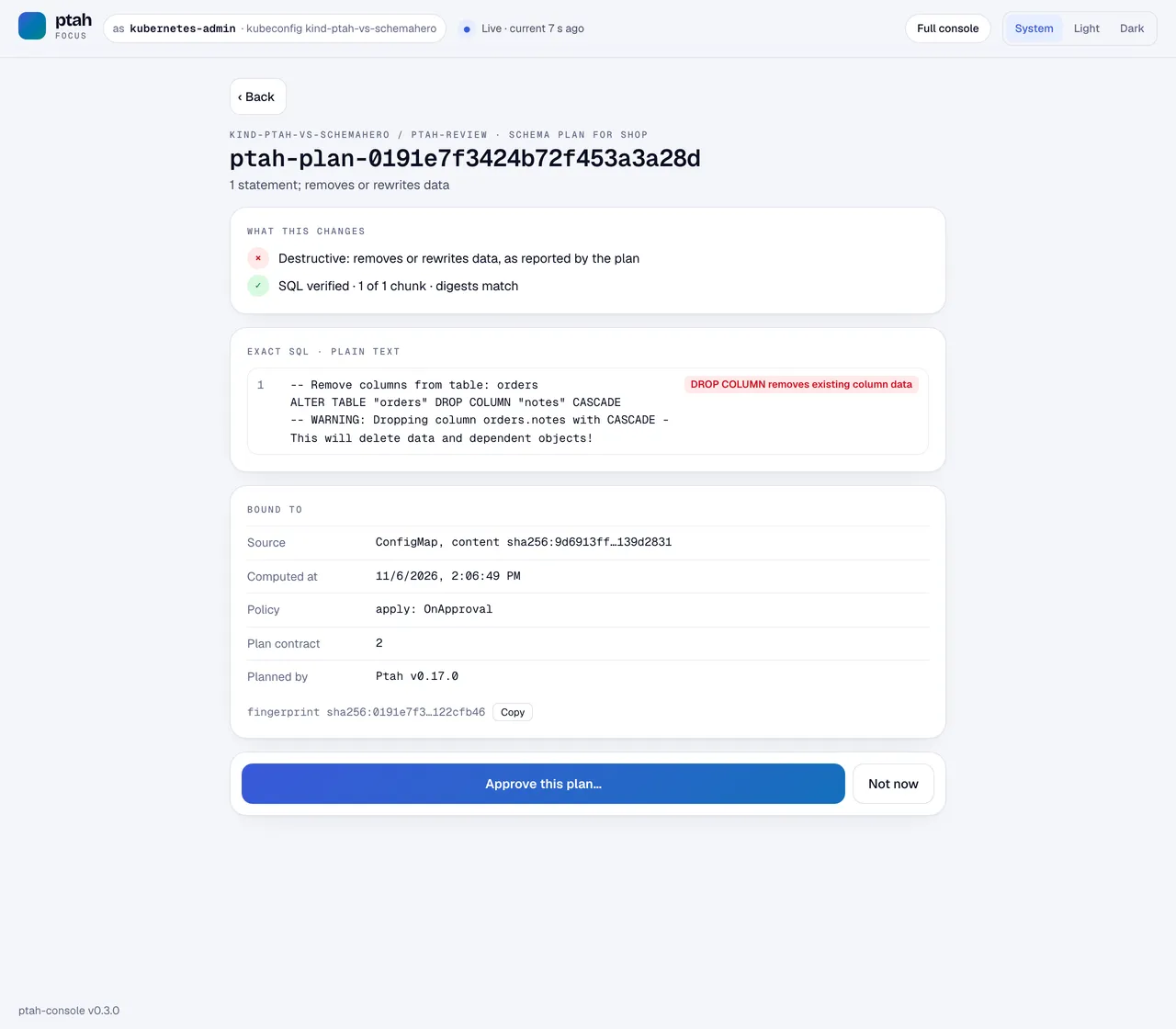
An approver reads the exact SQL with its severity, and sees what the approval is bound to:
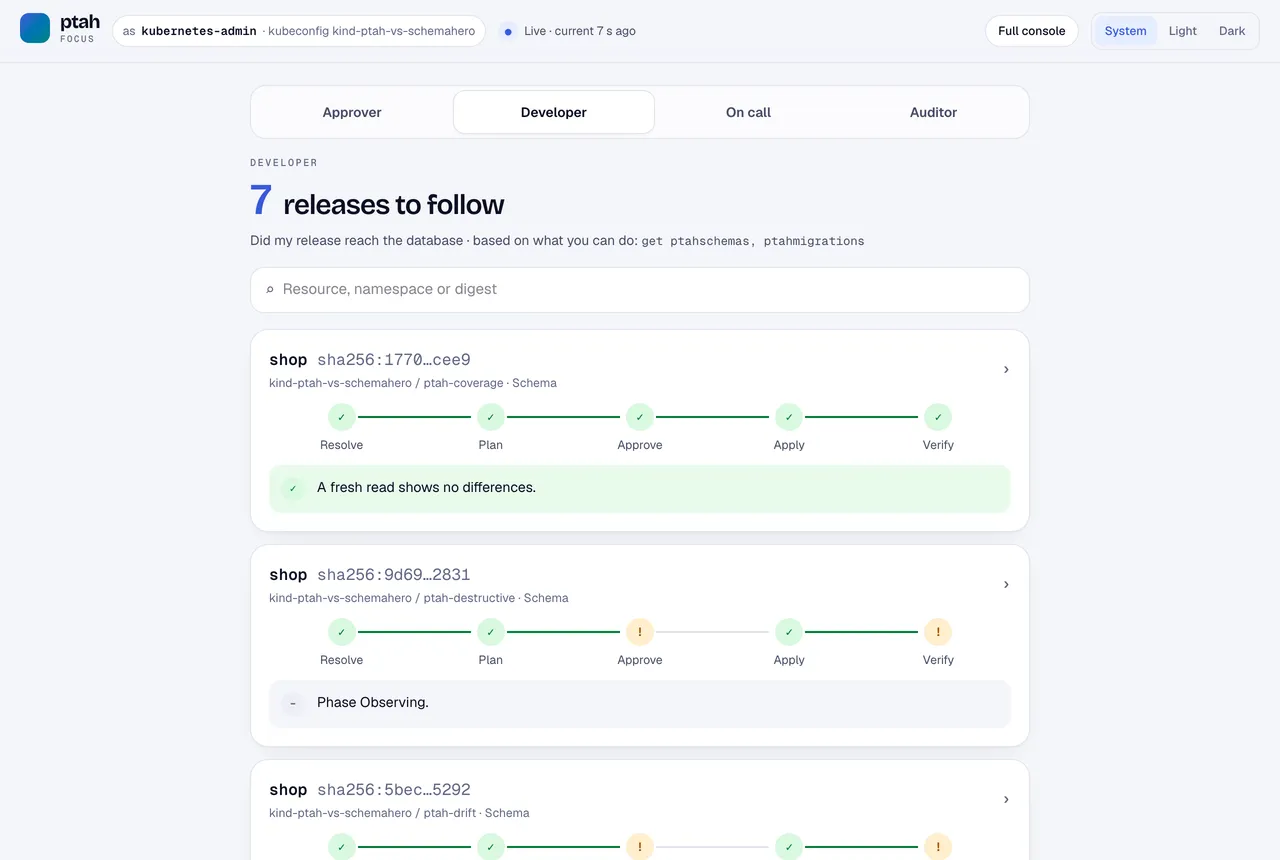
A developer follows a release through resolve, plan, approve, apply and verify:
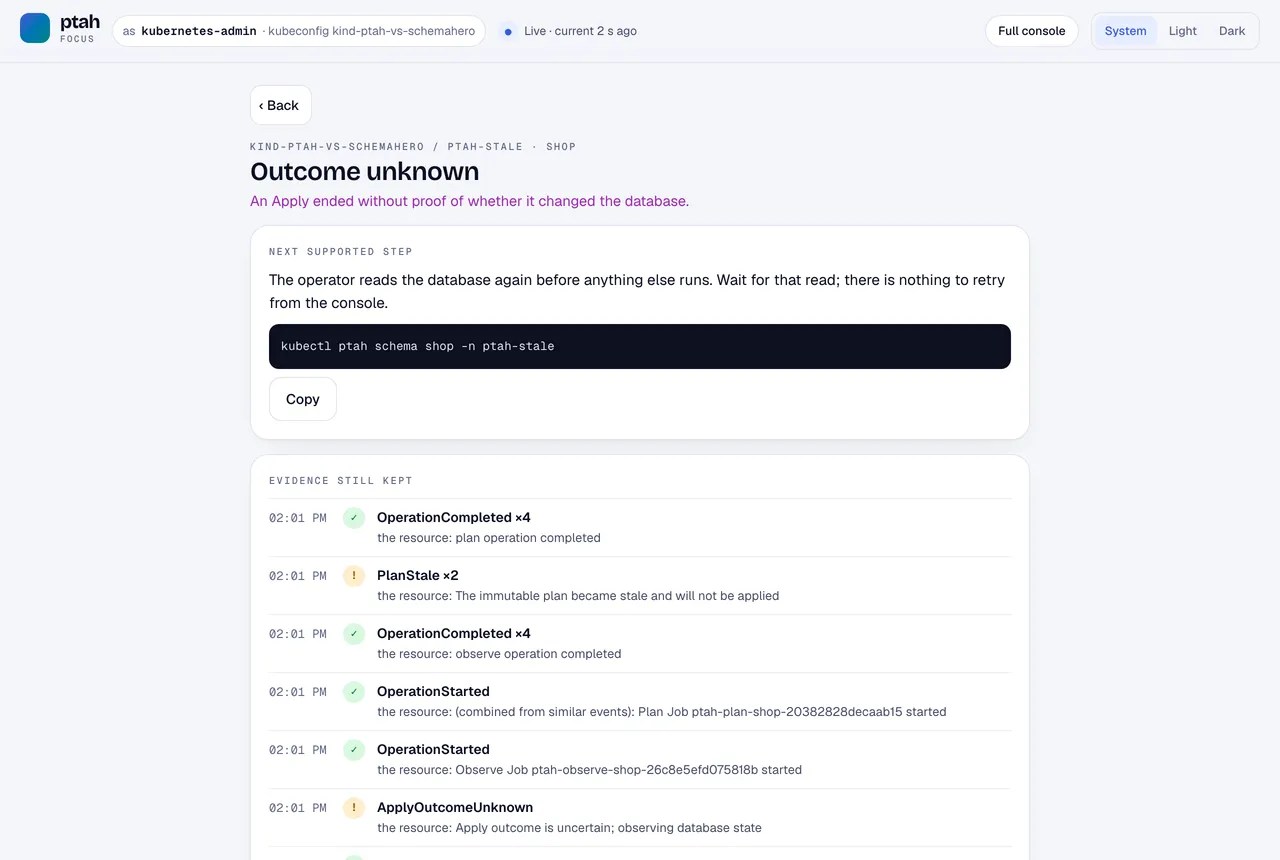
On call sees what is wrong, the next supported step, and the evidence. The stale plan from the first scenario looks like this:
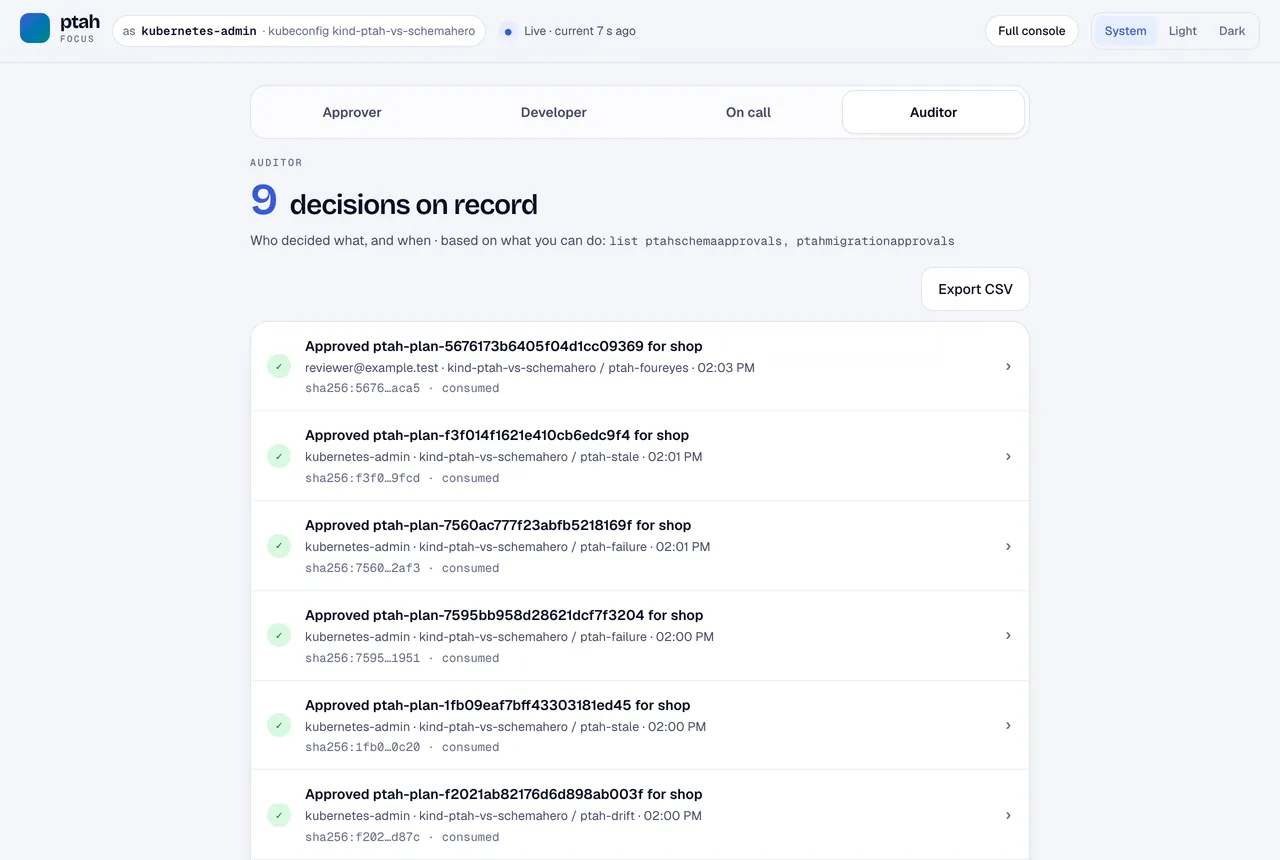
An auditor reads who decided what, and can export it:
The full console gives the installation’s state in one page:
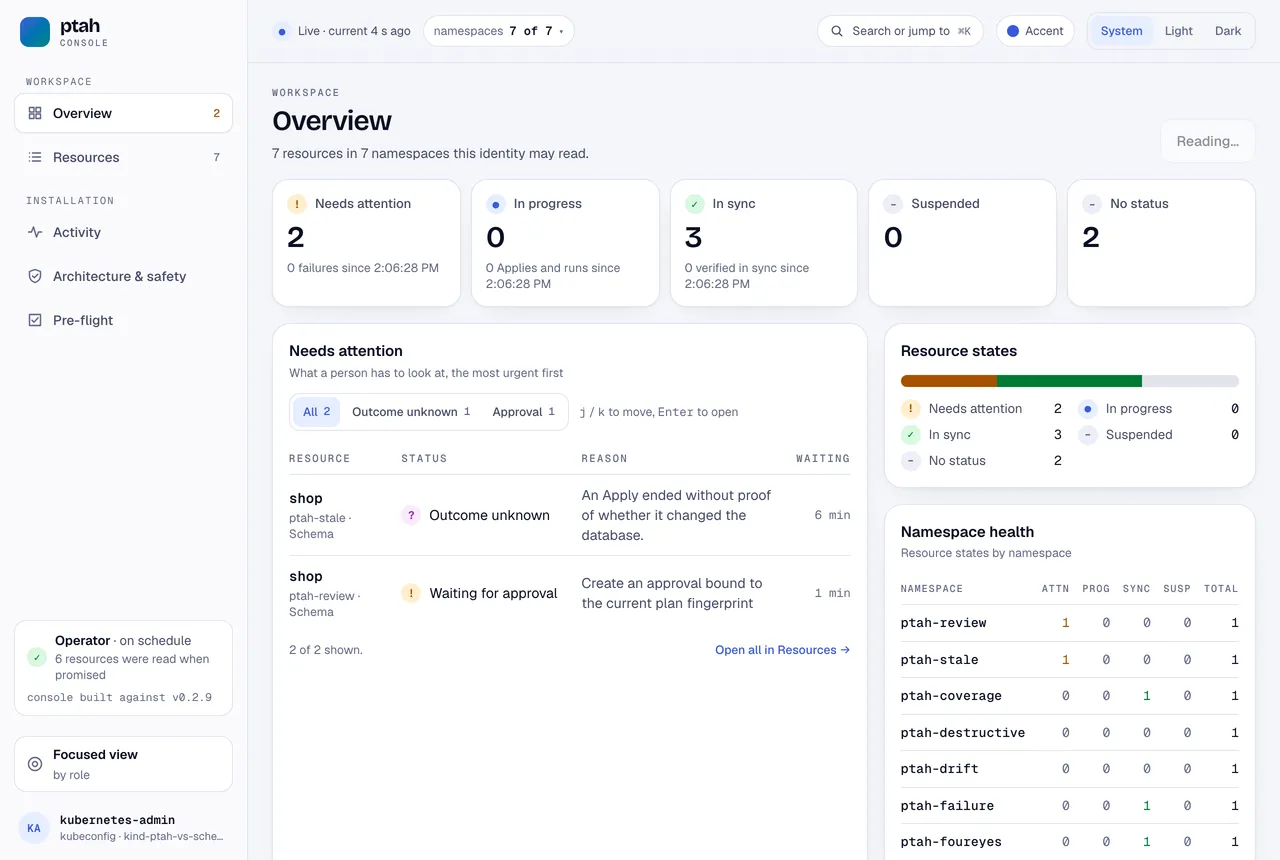
These screenshots come from our earlier run with operator 0.2.9 and Ptah Console 0.3.0. Operator 0.2.10 adds a field to every plan that Console 0.3.2 does not read yet, so it shows each new plan as unsupported and holds approval. Until the console release that reads it (ptah-console#167), approve with kubectl ptah from the operator release.
Where SchemaHero is simpler
Section titled “Where SchemaHero is simpler”SchemaHero is quicker to start. kubectl schemahero install is one command with no values, and it was ready in 5 seconds with one pod and six custom resource definitions. Ptah Operator now installs as one Helm command with no values too, from its OCI chart, and it was ready in 35 seconds with three pods and ten definitions.
Its engine list is also longer. The Database resource has connection types for PostgreSQL, MySQL, CockroachDB, TimescaleDB, SQLite, RQLite and Cassandra, and we ran only PostgreSQL. Ptah Operator supports PostgreSQL 17 and 18, and MySQL 8.4 today, and we are widening that list. If your engine is outside it, SchemaHero may be your only operator of the two.
For a team that wants a controller to run reviewed schema changes against a database people also touch, the scenarios above are the decision. Ptah Operator keeps a reviewer’s approval true to the database it was given for.
To try it, start with your first schema change with the operator, or see how OCI artifacts become database plans. The operator documentation covers install and approvals.
Put Ptah to work
Example files
- history/migrations/0000000001_create_customers.down.sql
- history/migrations/0000000001_create_customers.up.sql
- history/migrations/0000000002_add_phone.down.sql
- history/migrations/0000000002_add_phone.up.sql
- history/migrations/0000000003_rename_full_name.down.sql
- history/migrations/0000000003_rename_full_name.up.sql
- history/migrations/0000000004_add_locale.down.sql
- history/migrations/0000000004_add_locale.up.sql
- history/ptah/migration-first.yaml
- history/ptah/migration-next.yaml
- history/ptah/migration.yaml
- history/ptah/schema-after.sql
- history/ptah/schema-before.sql
- history/ptah/schema.yaml
- history/schemahero/customers-v1.yaml
- history/schemahero/customers-v2.yaml
- history/schemahero/customers-v3-renamed.yaml
- history/schemahero/customers-v4.yaml
- history/schemahero/database.yaml
- history/sql/seed-renamed.sql
- history/sql/seed.sql
- history/sql/server.sql
- kind.yaml
- lab/postgres.yaml
- measured/commands.json
- measured/composite/ptah-add-column-plan.txt
- measured/composite/ptah.excerpt.txt
- measured/composite/schemahero-add-column-plan.txt
- measured/composite/schemahero.excerpt.txt
- measured/coverage/ptah-approve.txt
- measured/coverage/ptah-catalog.txt
- measured/coverage/ptah-crds.txt
- measured/coverage/ptah-plan.txt
- measured/coverage/ptah-refresh.txt
- measured/coverage/ptah-schema-after-refresh.txt
- measured/coverage/ptah-schema.txt
- measured/coverage/ptah-why-approval.txt
- measured/coverage/schemahero-api-resources.txt
- measured/coverage/schemahero-crds.txt
- measured/coverage/schemahero-gin-database.txt
- measured/coverage/schemahero-gin-plan.txt
- measured/coverage/schemahero-gin.excerpt.txt
- measured/coverage/schemahero-table-fields.txt
- measured/coverage/schemahero-view-fields.txt
- measured/destructive/ptah-after.txt
- measured/destructive/ptah-before.txt
- measured/destructive/ptah-blocked.txt
- measured/destructive/ptah-plan.excerpt.txt
- measured/destructive/ptah-plan.txt
- measured/destructive/ptah-schema.excerpt.txt
- measured/destructive/ptah-schema.txt
- measured/destructive/schemahero-after.txt
- measured/destructive/schemahero-before.txt
- measured/destructive/schemahero-describe.excerpt.txt
- measured/destructive/schemahero-describe.txt
- measured/destructive/schemahero-dropped.txt
- measured/destructive/schemahero-migrations.txt
- measured/drift/ptah-database.txt
- measured/drift/ptah-detected.txt
- measured/drift/ptah-hand-change.txt
- measured/drift/ptah-plan.excerpt.txt
- measured/drift/ptah-plan.txt
- measured/drift/ptah-schema.excerpt.txt
- measured/drift/ptah-schema.txt
- measured/drift/schemahero-database.txt
- measured/drift/schemahero-hand-change.txt
- measured/drift/schemahero-log-mentions.txt
- measured/drift/schemahero-migrations.txt
- measured/drift/schemahero-new-migrations-after-5m.txt
- measured/drift/schemahero-table-status.txt
- measured/failure/ptah-after-fix.txt
- measured/failure/ptah-apply-log.txt
- measured/failure/ptah-apply-pod.txt
- measured/failure/ptah-approve.txt
- measured/failure/ptah-duplicate.txt
- measured/failure/ptah-events.txt
- measured/failure/ptah-failed.txt
- measured/failure/ptah-fix.txt
- measured/failure/ptah-index-final.txt
- measured/failure/ptah-plan.excerpt.txt
- measured/failure/ptah-plan.txt
- measured/failure/ptah-reapprove.txt
- measured/failure/ptah-schema-after-fix.txt
- measured/failure/ptah-schema.txt
- measured/failure/schemahero-approve.txt
- measured/failure/schemahero-attempts-after-2m.txt
- measured/failure/schemahero-duplicate.txt
- measured/failure/schemahero-events.txt
- measured/failure/schemahero-fix.txt
- measured/failure/schemahero-migration-status.txt
- measured/failure/schemahero-migrations.txt
- measured/failure/schemahero-plan.txt
- measured/failure/schemahero-recovered.txt
- measured/failure/schemahero-table-status.txt
- measured/foreign/documented-login-hand-change.txt
- measured/foreign/documented-login-plan.txt
- measured/foreign/documented-login-role.txt
- measured/foreign/documented-login-schema.txt
- measured/foreign/superuser-login-hand-change.txt
- measured/foreign/superuser-login-plan.txt
- measured/foreign/superuser-login-role.txt
- measured/foreign/superuser-login-schema.txt
- measured/foureyes/ptah-author-approves.txt
- measured/foureyes/ptah-recorded.txt
- measured/foureyes/ptah-reviewer-approves.txt
- measured/guard/ptah-author-selects-always.excerpt.txt
- measured/guard/ptah-author-selects-always.txt
- measured/history/cluster-deleted.txt
- measured/history/ptah-approvals-after.txt
- measured/history/ptah-approvals-before.txt
- measured/history/ptah-fresh-migration.txt
- measured/history/ptah-fresh-revisions.txt
- measured/history/ptah-fresh-schema-diff.txt
- measured/history/ptah-log-actor-ptah_fresh.txt
- measured/history/ptah-log-actor-ptah_migration.txt
- measured/history/ptah-migration-after.excerpt.txt
- measured/history/ptah-migration-after.txt
- measured/history/ptah-next-migration.excerpt.txt
- measured/history/ptah-next-migration.txt
- measured/history/ptah-rename-migration.txt
- measured/history/ptah-rename-rows.txt
- measured/history/ptah-revisions-after.txt
- measured/history/ptah-revisions-before.txt
- measured/history/ptah-revisions-final.txt
- measured/history/ptah-rows-after-loss.txt
- measured/history/ptah-rows-after.txt
- measured/history/ptah-schema-after.txt
- measured/history/ptah-schema-rename-blocked.txt
- measured/history/ptah-schema-rename-plan.excerpt.txt
- measured/history/ptah-schema-rename-plan.txt
- measured/history/ptah-schema-rename-rows.txt
- measured/history/ptah-schema-tables-before.txt
- measured/history/ptah-tables-before.txt
- measured/history/schemahero-deleted-columns.txt
- measured/history/schemahero-deleted-delete.txt
- measured/history/schemahero-deleted-migrations.txt
- measured/history/schemahero-deleted-table-status.txt
- measured/history/schemahero-fresh-plan.txt
- measured/history/schemahero-migrations-after.txt
- measured/history/schemahero-migrations-before.txt
- measured/history/schemahero-rename-approve.txt
- measured/history/schemahero-rename-attempts.txt
- measured/history/schemahero-rename-plan.excerpt.txt
- measured/history/schemahero-rename-plan.txt
- measured/history/schemahero-rename-rows.txt
- measured/history/schemahero-rename-status.txt
- measured/history/schemahero-rows-after-loss.txt
- measured/history/schemahero-sql-after.txt
- measured/history/schemahero-sql-before.txt
- measured/history/schemahero-tables-after.txt
- measured/history/schemahero-tables-before.txt
- measured/identity/kubernetes-user.txt
- measured/identity/ptah-approve.txt
- measured/identity/ptah-recorded.txt
- measured/identity/schemahero-approve-as-anyone.txt
- measured/identity/schemahero-recorded.txt
- measured/install/ptah-operator.txt
- measured/install/schemahero.txt
- measured/stale/ptah-apply-log.txt
- measured/stale/ptah-approval.excerpt.txt
- measured/stale/ptah-approve.txt
- measured/stale/ptah-column.txt
- measured/stale/ptah-events.txt
- measured/stale/ptah-hand-change.txt
- measured/stale/ptah-new-plan.excerpt.txt
- measured/stale/ptah-new-plan.txt
- measured/stale/ptah-plan.txt
- measured/stale/ptah-schema.txt
- measured/stale/schemahero-approve.txt
- measured/stale/schemahero-armed-statement.txt
- measured/stale/schemahero-attempts-after-3m.txt
- measured/stale/schemahero-column-final.txt
- measured/stale/schemahero-column.txt
- measured/stale/schemahero-error.excerpt.txt
- measured/stale/schemahero-hand-change.txt
- measured/stale/schemahero-hand-revert.txt
- measured/stale/schemahero-phase.txt
- measured/stale/schemahero-plan.txt
- measured/stale/schemahero-status-after-3m.txt
- measured/superseded/ptah-approve-first.txt
- measured/superseded/ptah-current-plan.txt
- measured/superseded/ptah-database-columns.txt
- measured/superseded/ptah-first-plan.txt
- measured/superseded/schemahero-approve-first.txt
- measured/superseded/schemahero-database-columns.txt
- measured/superseded/schemahero-first-plan-after-edit.txt
- measured/superseded/schemahero-first-plan.txt
- measured/superseded/schemahero-migrations.txt
- measured/superseded/schemahero-spec-columns.txt
- measured/versions.txt
- ptah/schema-coverage.sql
- ptah/schema-unique-customer.sql
- ptah/schema-v1.sql
- ptah/schema-v2.sql
- ptah/schema-v3-superseded.sql
- ptah/schema-v4-current.sql
- ptah/schema-without-notes.sql
- ptah/shop.yaml
- ptah/stores-v1.sql
- ptah/stores-v2.sql
- README.md
- schemahero/customers-v1.yaml
- schemahero/database.yaml
- schemahero/documents-gin.yaml
- schemahero/orders-unique-customer.yaml
- schemahero/orders-v1.yaml
- schemahero/orders-v2.yaml
- schemahero/orders-v3-superseded.yaml
- schemahero/orders-v4-current.yaml
- schemahero/orders-without-notes.yaml
- schemahero/regions.yaml
- schemahero/stores-v1.yaml
- schemahero/stores-v2.yaml
- sql/coverage-check.sql
- sql/hand-made-objects.sql
- sql/roles.sql
- sql/seed.sql
- verified.json