 Ptah
PtahTransactional SQLite Upgrades and Full-Text Search with Ptah
We tested Ptah in MailCollector to turn repeated startup schema changes into recorded upgrades and add FTS5 search while preserving existing mail.

Ptah helps you plan, review, and apply database migrations. Try in your browser
A mail database holds more than messages. It also holds account credentials, labels, pending jobs, and operations waiting to reach the mail provider. Adding search to an existing installation has to preserve that state while upgrading the schema underneath it.
MailCollector stores its mail in SQLite behind a Node server. Its maintainer had already described the next step in Issue #11: ordered, transactional migrations, upgrade tests for older databases, and FTS5 search.
The project already records schema versions. The difficulty is that much of its upgrade logic still runs as a sequence of column checks, data repairs, and table changes during startup. A version row does not mark the completion of that entire sequence.
We implemented and tested a transition using Ptah 0.12.0. Existing databases finish the historical upgrades once; subsequent changes run as SQL migrations. The first new migration adds a search index and fills it from existing mail. Our upstream PR is open and awaiting review. This article describes the tested proposal in our fork. The supporting files record the examples and validation.
Establish a reliable starting point
Section titled “Establish a reliable starting point”MailCollector’s original schema_migrations table contains a version, a name,
and an application timestamp. Its startup method also uses PRAGMA table_info
and addColumnIfMissing to accommodate older database layouts. Some databases
need a message-table rebuild to replace the old uniqueness rule on
(account_id, uid) with provider-aware message identity.
Treating every database with version 2 as the same schema would skip that work. Instead, the proposal moves the existing upgrade logic into a frozen legacy adapter. The adapter completes the column additions, identity rebuild, and data repairs in one transaction. It checks foreign keys before committing and records version 3 only after success. Later startups skip it.
SQLite requires foreign-key enforcement to be disabled outside a transaction that rebuilds the message table. The adapter therefore uses its own connection. It performs the foreign-key check inside the transaction and closes that connection before Ptah starts. Application connections still enable foreign keys.
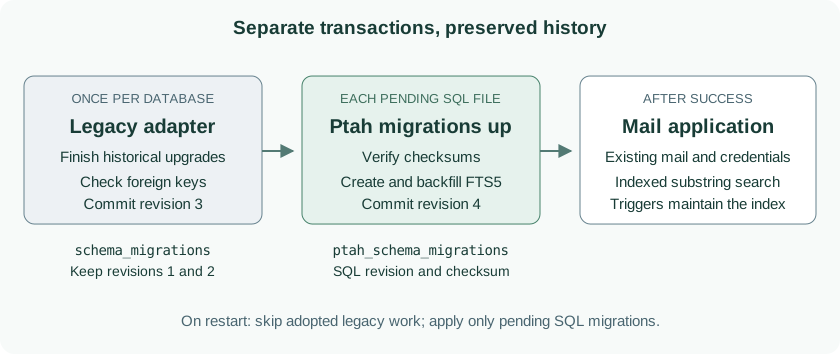
The original revision rows and timestamps stay in schema_migrations.
Ptah records its SQL migrations in ptah_schema_migrations, which has its own
revision and checksum fields. This avoids rewriting the old history to fit a
format it never used.
The transaction boundary is deliberate: legacy adoption commits separately from each later SQL migration. If the search migration fails, its changes roll back and startup stops. An already completed adoption remains recorded.
Make the search index a migration
Section titled “Make the search index a migration”FTS5 is SQLite’s full-text search module. For MailCollector, we use its
trigram tokenizer: it indexes overlapping groups of three characters, allowing
SQLite to accelerate substring searches such as finding voice inside Invoice.
The migration declares an external-content index. This formatted excerpt shows which message fields it covers:
CREATE VIRTUAL TABLE messages_fts USING fts5( subject, from_name, from_address, to_text, snippet, text_body, content='messages', content_rowid='id', tokenize='trigram');messages remains the source of message content. The FTS row ID corresponds to
messages.id; the application does not need another copy of its message model.
The same migration creates triggers for inserts, deletes, and updates to the indexed fields or row ID. This matters for mail because a message’s body can arrive after its headers. Fetching the body later must make that text searchable. Editing a draft and deleting an account must also update the index.
Creating triggers only covers future changes. The migration fills the index from existing messages with:
INSERT INTO messages_fts(messages_fts) VALUES('rebuild');The index, triggers, and initial backfill belong to one SQL migration. Ptah applies that file in one transaction, so a failed backfill cannot leave a successfully recorded, partially populated search migration.
Apply once, then leave the completed migration alone
Section titled “Apply once, then leave the completed migration alone”The following example starts with a disposable mail database whose core schema
has reached the adoption boundary. Its old revision ledger contains versions
1 through 3. The migrations directory contains the proposed FTS5 migration and
its checksum file. The supporting instructions explain how to prepare this
fixture; these are not instructions to stamp version 3 onto an arbitrary database.
This is the Ptah command used by the integration, shown with the example’s relative database path:
ptah migrations up --db-url sqlite://mail.db --migrations-dir migrations --migrations-table ptah_schema_migrations --tx-mode file --verify-sumThe recorded output ends with:
✅ Migrations completed successfully!Database is now at version: 4--migrations-table keeps Ptah’s history separate from the original ledger.
--tx-mode file makes each pending SQL file transactional. --verify-sum
requires the migration directory to match its committed checksum file.
Running the same command again gives:
✅ Database is already up to date!The search index is not rebuilt on each restart. New changes belong in new migration files; the legacy adapter stays frozen.
Preserve the meaning of a search
Section titled “Preserve the meaning of a search”MailCollector already searches for substrings across the subject, sender,
recipient, snippet, and text body. Switching directly to a word-oriented
MATCH query would change which messages appear.
The proposed query uses LIKE against the trigram index. Here is a subject-only
example against a message inserted before the migration:
SELECT rowid, subjectFROM messages_ftsWHERE subject LIKE '%voice%';The recorded result is:
[{"rowid":11,"subject":"Invoice attachment 工作报告"}]The application takes the union of matching IDs across all indexed fields,
then applies its existing visibility, folder, label, and account filters.
Message ordering and pagination stay unchanged. The existing % and _
wildcard behavior stays unchanged too.
There is a useful limit to state plainly. Trigram indexing needs a run of at
least three literal characters. A two-character query such as 工作 still
works, but uses the original scan path. A longer query such as 工作报 can use
the index. This is a
SQLite tokenizer constraint,
so adding FTS5 does not make every short search an indexed lookup.
Verify the upgrade as well as the search
Section titled “Verify the upgrade as well as the search”We tested an existing v0.5.1 schema and an older message-identity layout with populated accounts, messages, labels, jobs, operations, and sessions. The checks compare stored rows and original revision timestamps across the upgrade. Encrypted credential bytes stay unchanged, and the same key still decrypts them.
Failure tests interrupt both the legacy adoption and a later SQL migration. The first leaves the old schema and its history intact. The second rolls back its new virtual table and data. A repeated-startup test also rejects any attempt to rerun the old account repairs and checks that the FTS data remains unchanged.
For search, we seeded 30,000 messages before applying the migration. The tests compare the application results with the original predicate across all indexed fields, including partial words, Unicode, and wildcard queries. They also check that the query plan uses the trigram index for an eligible search. Insert, upsert, body-fetch, draft-edit, soft-delete, and account-cascade cases exercise index maintenance and result visibility.
The fork’s full Node test suite passed, along with type checks, the application build, Rust checks, and the Windows installer build. We also verified fresh and populated databases inside the production Docker image and started the server successfully. These checks exercise the proposed integration with the released Ptah binary.
Keep the integration focused
Section titled “Keep the integration focused”| Change | Reason |
|---|---|
| Frozen legacy adapter | Older databases need their historical repairs before SQL migrations can take over. |
| Separate Ptah revision table | Preserve the original history and add checksums for new SQL files. |
| FTS5 table, triggers, and backfill | Search existing mail and keep later writes synchronized. |
| Search predicate | Use the index while retaining substring semantics and existing filters. |
| Ptah in the server image and developer setup | Run the same migration files in deployment and tests. |
The Docker image copies the released Ptah binary and license from a pinned
multi-platform image. Direct Node development requires ptah on PATH or an
explicit PTAH_BIN path. Windows and Android remain API clients and need no
migration binary.
The PR covers the core mail schema. The separate client/account-sync stores keep their existing initialization. Cursor pagination and changes to message-body storage remain separate work from Issue #11. Future changes to the FTS tokenizer or virtual-table definition need an explicit rebuild migration; Ptah refuses to infer a destructive replacement from a changed virtual-table declaration.
The implementation is in PR #74, with the proposal in Issue #73. For the tool, see the SQLite guide and native migration commands, or try Ptah in the browser playground.
Put Ptah to work
Example files
- backfill.excerpt.sql
- commands/apply.txt
- commands/repeat.txt
- commands/status.txt
- commands/tests.txt
- fts-declaration.excerpt.sql
- measured/apply.excerpt.txt
- measured/apply.stderr.txt
- measured/apply.txt
- measured/commands.json
- measured/excerpt-check.json
- measured/fork-tests.txt
- measured/repeat.excerpt.txt
- measured/repeat.stderr.txt
- measured/repeat.txt
- measured/search.json
- measured/sqlite-cli-version.txt
- measured/sqlite-version.json
- measured/status.stderr.txt
- measured/status.txt
- measured/version.txt
- migrations/0000000004_message_search.down.sql
- migrations/0000000004_message_search.up.sql
- migrations/ptah.sum
- README.md
- search.sql
- seed.sql
- verified.json